
Last updated: December 2025
Looking for a comprehensive Google Professional Cloud Architect study guide to help you pass the PCA exam on your first attempt? You’ve come to the right place. This Google Professional Cloud Architect study guide covers everything you need to know—from exam domains and study resources to a detailed preparation timeline and strategies that will give you the confidence to succeed. Whether you’re an experienced cloud professional looking to validate your skills or transitioning into cloud architecture, this guide will provide you with a clear roadmap to certification success.
Table of Contents
- What is Google Professional Cloud Architect?
- Exam Details
- Exam Domains and Weighting
- Google Professional Cloud Architect Study Guide Resources
- Study Plan
- Exam Day Tips and Strategies
- Common Mistakes to Avoid
- Is Google Professional Cloud Architect Worth It in 2025?
- Frequently Asked Questions
- Conclusion
The Google Cloud Professional Cloud Architect certification has consistently ranked among the highest-paying IT certifications globally for the past five years. According to Skillsoft’s annual IT Skills and Salary survey, certified professionals command average salaries of $165,000 in the United States—a testament to the strong demand for skilled cloud architects who can design, develop, and manage enterprise-grade solutions on Google Cloud Platform. If you’re new to Google Cloud certifications, you might want to start with the Associate Cloud Engineer certification to build foundational knowledge before tackling this professional-level exam.
What is Google Professional Cloud Architect?
The Google Cloud Professional Cloud Architect certification validates your ability to design, develop, and manage robust, secure, scalable, and cost-effective cloud solutions using Google Cloud technologies. This professional-level credential demonstrates expertise in enterprise cloud strategy, solution design, workload migration approaches, deployment and orchestration, and architectural best practices aligned with the Google Cloud Well-Architected Framework.
This certification is ideal for:
- Cloud architects designing enterprise-scale GCP solutions
- Solutions architects transitioning from other cloud platforms
- IT professionals managing hybrid and multicloud environments
- DevOps engineers seeking to advance into architecture roles
- Technical leads responsible for cloud strategy decisions
Prerequisites and recommended experience:
- 3+ years of industry experience in IT or cloud computing
- 1+ years designing and managing solutions on Google Cloud
- Understanding of software development methodologies
- Familiarity with the Google Cloud Well-Architected Framework
- Experience with distributed systems and multitiered applications
Certified Google Cloud Professional Cloud Architects command average salaries between $145,000 and $175,000 annually, with senior roles in major tech hubs exceeding $190,000. The certification delivers an exceptional ROI—with a $200 exam fee and average salary increases of $35,000 compared to non-certified professionals, that’s a 175:1 return in the first year alone.
Professional Cloud Architect Exam Details
| Element | Details |
|---|---|
| Exam Name | Professional Cloud Architect |
| Number of Questions | 50-60 multiple-choice questions |
| Exam Duration | 120 minutes (2 hours) |
| Passing Score | Pass/Fail (estimated ~70%) |
| Cost | $200 USD |
| Available Languages | English, Japanese, Spanish, Portuguese |
| Delivery Format | Remote proctored or testing center |
| Case Studies | 2 case studies (20-30% of exam) |
| Certification Validity | 2 years |
| Renewal Option | $100 USD (1-hour, 25-question renewal exam) |
Google does not disclose numeric passing scores—you receive only a pass or fail result. If you don’t pass, you’ll receive section-level feedback in your Candidate Portal to guide your next attempt. You can attempt the exam up to 4 times within a two-year period.
Exam Domains and Weighting
The Professional Cloud Architect exam is structured around six key domains, each testing different aspects of cloud architecture knowledge. Understanding the weighting of each domain will help you prioritize your study time effectively within this Google Professional Cloud Architect study guide.
Section 1: Designing and Planning a Cloud Solution Architecture (~25%)
This is the largest domain and the foundation of the exam. You’ll be tested on your ability to design cloud infrastructures that meet both business and technical requirements, including cost optimization, security considerations, and business continuity planning.
Critical points to master:
- Translating business requirements into technical architecture decisions
- The Google Cloud Well-Architected Framework pillars
- Integration patterns with external systems and data movement strategies
- Migration planning using Google Cloud Migration Center
- Success measurements including KPIs, ROI, and metrics
- Gemini Cloud Assist and AI integration for solution design
💡 Pro Tip: Review the four official case studies (Altostrat Media, Cymbal Retail, EHR Healthcare, and KnightMotives Automotive) before your exam. Case study questions make up 20-30% of the exam, and understanding these scenarios in advance saves valuable time during the test.
Section 2: Managing and Provisioning a Solution Infrastructure (~17.5%)
This domain focuses on the practical implementation of cloud solutions, including network configuration, storage systems, compute resources, and AI/ML workflows using Vertex AI.
Critical points to master:
- VPC design, hybrid networking, and load balancing strategies
- Data storage allocation and lifecycle management
- Compute resource provisioning (GCE, GKE, Cloud Run, serverless)
- Vertex AI pipelines and AI Hypercomputer integration
- Infrastructure as Code with Terraform and Infrastructure Manager
Section 3: Designing for Security and Compliance (~17.5%)
Security is woven throughout the exam, but this domain specifically tests your knowledge of identity management, data protection, and regulatory compliance on GCP.
Critical points to master:
- Identity and Access Management (IAM) best practices
- Resource hierarchy design (organizations, folders, projects)
- Cloud Key Management Service (Cloud KMS) for encryption
- VPC Service Controls and context-aware access
- Securing AI with Model Armor and Sensitive Data Protection
- Compliance frameworks (SOC 2, HIPAA, PCI-DSS, GDPR)
💡 Pro Tip: Security questions often present multiple “correct” answers—your job is to identify the BEST option. Default to the principle of least privilege and managed services over self-managed solutions when in doubt.
Section 4: Analyzing and Optimizing Technical and Business Processes (~15%)
This domain bridges technical architecture with business value, testing your ability to optimize workflows, manage stakeholders, and ensure business continuity.
Critical points to master:
- CI/CD pipeline design and software development lifecycle
- Troubleshooting and root cause analysis methodologies
- Disaster recovery planning and business continuity
- Cost optimization strategies (CapEx vs. OpEx)
- Change management and stakeholder facilitation
Section 5: Managing Implementation (~12.5%)
This domain covers the practical aspects of deploying and managing cloud solutions, including API management, testing frameworks, and programmatic interaction with Google Cloud.
Critical points to master:
- Application and infrastructure deployment best practices
- API management with Apigee
- Google Cloud SDKs (gcloud, gsutil, bq)
- Cloud Shell, Cloud Code, and Cloud Emulators
- Terraform and Infrastructure as Code implementation
Section 6: Ensuring Solution and Operations Excellence (~12.5%)
The final domain focuses on maintaining operational excellence through observability, reliability engineering, and continuous improvement.
Critical points to master:
- Google Cloud Observability solutions (monitoring, logging, alerting)
- SLIs, SLOs, and SLAs definition and implementation
- Deployment and release management strategies
- Reliability practices including chaos engineering and load testing
- Quality control measures and benchmarking
Best Google Professional Cloud Architect Study Guide Resources for 2025
Success on the Professional Cloud Architect exam requires a combination of theoretical knowledge and hands-on experience. This section of the Google Professional Cloud Architect study guide covers the best official resources to support your preparation.
Official Google Cloud Documentation
The official documentation is your primary reference for accurate, up-to-date information on all GCP services and best practices.
- Google Cloud Documentation – Comprehensive guides for all GCP services
- Cloud Architecture Center – Reference architectures and design patterns
- Enterprise Best Practices – Organizational structure and security guidelines
- Well-Architected Framework – Essential reading for understanding architectural trade-offs
Official Training and Learning Paths
Google provides structured learning paths specifically designed for the Professional Cloud Architect certification.
- Google Cloud Skills Boost – The official learning platform with courses, labs, and skill badges
- Professional Cloud Architect Learning Path – Curated curriculum covering all exam domains
- Qwiklabs Hands-On Labs – Practical exercises in real GCP environments
- Google Cloud Instructor-Led Training – Available through authorized training partners
💡 Pro Tip: Google Cloud Skills Boost subscriptions often include exam vouchers. If your employer offers training budgets, request a subscription instead of a single course—it delivers more value for the same cost.
Official Practice Exams and Sample Questions
Practice exams are essential for understanding the exam format and identifying knowledge gaps before test day.
- Google Cloud Official Sample Questions – Available on the certification page to familiarize yourself with question formats
- CertifHub Professional Cloud Architect Practice Questions – 420+ practice questions with detailed explanations mirroring real exam scenarios
Hands-On Practice
The exam heavily emphasizes practical application—hands-on experience is non-negotiable for success.
- Google Cloud Free Tier – $300 in free credits for new accounts, plus always-free tier resources
- Google Cloud Skills Boost Labs – Guided labs with pre-configured environments
- Personal Projects – Build multi-region applications, configure hybrid networking, implement CI/CD pipelines
Practice with Realistic Exam Questions
Test your knowledge with 420+ realistic Google Professional Cloud Architect practice questions on CertifHub featuring detailed explanations that mirror real exam scenarios. Join 236+ certified professionals who prepared with our platform. Build confidence, identify knowledge gaps, and master the exam format before test day.
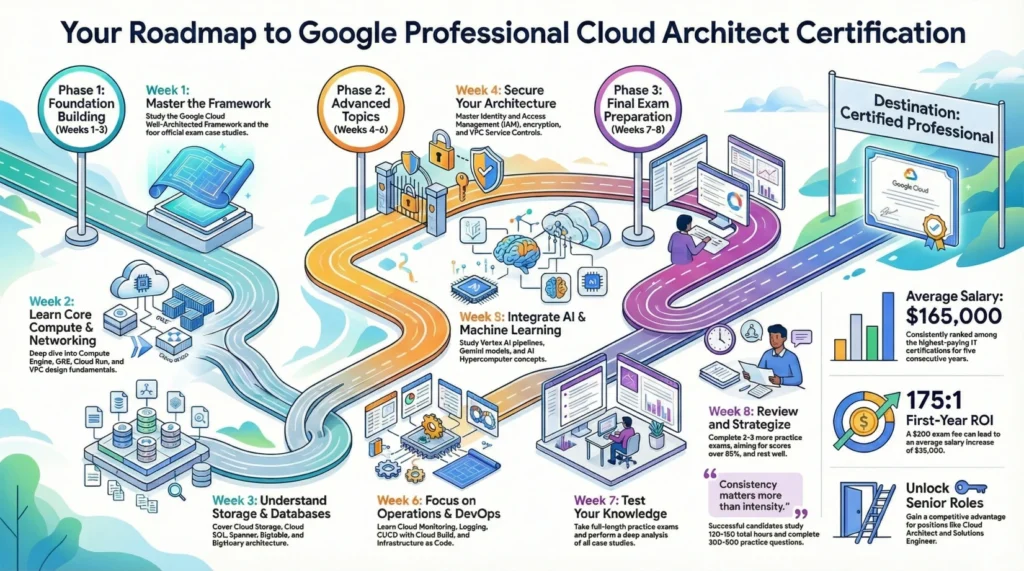
8-Week Study Plan for Google Professional Cloud Architect
This structured Google Professional Cloud Architect study guide timeline is designed for professionals who can dedicate 10-15 hours per week to preparation. Adjust the schedule based on your existing GCP experience—those with significant hands-on experience may compress this to 6 weeks, while newcomers might extend it to 10-12 weeks.
Phase 1: Foundation Building (Weeks 1-3)
Week 1: Cloud Fundamentals and Well-Architected Framework
- Review the official exam guide and case studies thoroughly
- Study the Google Cloud Well-Architected Framework pillars
- Complete introductory labs on Cloud Skills Boost
- Set up your Google Cloud free tier account for practice
Week 2: Compute and Networking Fundamentals
- Deep dive into Compute Engine, GKE, Cloud Run, and App Engine
- Study VPC design, subnets, firewalls, and load balancing
- Complete hands-on labs for each compute service
- Practice designing network topologies for hybrid environments
Week 3: Storage and Database Services
- Master Cloud Storage classes, lifecycle policies, and retention
- Study database options: Cloud SQL, Spanner, Bigtable, Firestore, AlloyDB
- Understand BigQuery architecture and optimization
- Practice data migration scenarios using Transfer Service
Phase 2: Advanced Topics (Weeks 4-6)
Week 4: Security and Identity Management
- Master IAM policies, roles, and service accounts
- Study Cloud KMS, Secret Manager, and encryption options
- Learn VPC Service Controls and Organization Policies
- Practice implementing least-privilege access patterns
Week 5: AI/ML Integration and Vertex AI
- Study Vertex AI pipelines and AutoML capabilities
- Understand AI Hypercomputer and GPU/TPU allocation
- Review Gemini models and Model Garden integration
- Complete AI/ML labs on Cloud Skills Boost
Week 6: Operations, Reliability, and DevOps
- Master Cloud Monitoring, Logging, and Alerting
- Study SLIs, SLOs, and error budgets
- Learn CI/CD patterns with Cloud Build and Artifact Registry
- Practice Infrastructure as Code with Terraform
Phase 3: Exam Preparation (Weeks 7-8)
Week 7: Practice Exams and Case Study Analysis
- Take your first full-length practice exam
- Analyze case studies deeply—create one-page summaries for each
- Review weak areas identified from practice tests
- Focus on scenario-based decision-making
Week 8: Final Review and Exam Strategy
- Complete 2-3 more practice exams, aiming for 85%+
- Review all case studies one final time
- Rest well the day before your exam
- Schedule your exam and prepare your testing environment
⚠️ Important Note: Consistency matters more than intensity. Studying 2 hours daily is more effective than cramming 14 hours on weekends. Most successful candidates complete 300-500 practice questions and spend 120-180 total hours preparing.
Exam Day Tips and Strategies
Before the Exam
- Arrive at the testing center 15-30 minutes early, or prepare your remote testing environment at least an hour before
- Bring valid government-issued ID matching your registration name exactly
- Review case studies one final time—you can access them during the exam on a split screen
- Ensure you’re well-rested; avoid cramming the night before
- Eat a proper meal and stay hydrated before your exam
During the Exam
- Read each question carefully—identify key requirements and constraints
- Use the case study split-screen feature for context on relevant questions
- Eliminate obviously wrong answers first to improve your odds
- Flag difficult questions and return to them after completing easier ones
- Aim to reach case study questions with 45-50 minutes remaining
- Don’t spend more than 2-3 minutes on any single question
- When two answers seem equally correct, choose the one that follows GCP best practices and managed services
Technical Tips
- For security questions, default to least-privilege access and managed encryption
- When cost optimization is mentioned, consider sustained use discounts, committed use, and right-sizing
- For hybrid scenarios, evaluate Cloud Interconnect vs. VPN based on bandwidth and reliability requirements
- Trust managed services over self-managed solutions unless specific requirements dictate otherwise
- Remember that Cloud Spanner is ideal for global consistency, while regional solutions may be more cost-effective for local workloads
Common Mistakes to Avoid
Mistake 1: Neglecting Case Studies
Problem: Many candidates skip reviewing the official case studies before the exam, wasting valuable time reading them for the first time during the test.
Solution: Study all four case studies (Altostrat Media, Cymbal Retail, EHR Healthcare, KnightMotives Automotive) thoroughly before exam day. Create one-page summaries highlighting key requirements, constraints, and likely architectural solutions.
Mistake 2: Focusing Only on Theory
Problem: The exam tests practical application, not just theoretical knowledge. Candidates who only read documentation without hands-on practice struggle with scenario-based questions.
Solution: Complete at least 40-50 hands-on labs on Cloud Skills Boost. Build personal projects implementing multi-region deployments, hybrid networking, and CI/CD pipelines.
Mistake 3: Underestimating the Well-Architected Framework
Problem: The Google Cloud Well-Architected Framework is fundamental to the exam, yet many candidates treat it as supplementary material.
Solution: Study each pillar (operational excellence, security, reliability, performance optimization, cost optimization, sustainability) and understand how to apply them when evaluating architectural trade-offs.
Mistake 4: Poor Time Management
Problem: With 50-60 questions in 120 minutes, spending too long on difficult questions leaves insufficient time for easier ones.
Solution: Practice with timed exams. Flag difficult questions and return to them later. Aim for an average of 2 minutes per question, leaving buffer time for review.
Mistake 5: Ignoring Recent GCP Updates
Problem: The 2025 exam includes new topics like Vertex AI, Gemini integration, and AI Hypercomputer that weren’t in older study materials.
Solution: Always check the official exam guide for updates. Follow the Google Cloud Blog for new service announcements and ensure your study materials reflect current content.
Is Google Professional Cloud Architect Worth It in 2025?
Career Benefits
The Professional Cloud Architect certification opens doors to senior-level positions and validates your expertise to employers worldwide. Certified professionals report several key benefits:
- Access to cloud architect, solutions engineer, and technical program manager roles
- Recognition as a trusted expert in GCP architecture
- Competitive advantage in a market with persistent cloud skills gaps
- Foundation for additional specializations (Security, Data, ML)
- Improved confidence in architectural decision-making
Financial ROI
The numbers speak for themselves:
- Average US salary: $165,000/year (Skillsoft 2025 survey)
- Salary range: $145,000 – $190,000+ depending on location and experience
- Exam cost: $200 USD
- First-year ROI: ~175:1 based on average salary uplift of $35,000
- Freelance rates: $80-$150+ per hour for certified architects
The certification has appeared in the top 5 highest-paying IT certifications list for five consecutive years, reflecting sustained market demand.
Who Benefits Most
This certification delivers maximum value for:
- Cloud engineers ready to advance into architecture roles
- AWS or Azure professionals expanding to multicloud expertise
- IT managers overseeing cloud transformation initiatives
- Consultants advising clients on GCP implementation
- DevOps engineers seeking broader architectural responsibilities
For those considering a comprehensive Google Cloud certification path, the Professional Cloud Architect serves as an excellent milestone that can lead to specialized credentials in security, data engineering, or machine learning.
Frequently Asked Questions
How long does it take to prepare for the Google Professional Cloud Architect exam?
Most candidates require 8-12 weeks of dedicated study, investing 10-15 hours per week. Those with significant GCP hands-on experience may prepare in 6 weeks, while newcomers to Google Cloud should plan for 12+ weeks.
Is there a prerequisite certification required for the Professional Cloud Architect?
No, there are no formal prerequisites. However, Google recommends 3+ years of industry experience, including 1+ years designing and managing solutions on Google Cloud. The Associate Cloud Engineer certification provides helpful foundational knowledge but is not required.
What is the passing score for the Professional Cloud Architect exam?
Google does not disclose a specific numeric passing score. You receive a pass or fail result only. Based on candidate feedback and industry estimates, the passing threshold is approximately 70%.
How often can I retake the exam if I fail?
You can attempt the exam up to 4 times within a two-year period. There’s a 14-day waiting period after your first failed attempt. If you don’t pass, you’ll receive section-level feedback to help target your further study.
How long is the certification valid?
The Professional Cloud Architect certification is valid for 2 years. You can renew by taking a shorter renewal exam ($100 USD, 1 hour, 25 questions) starting 60 days before your certification expiration date.
Are the case studies provided during the exam?
Yes, you can view the case studies on a split screen during the exam. However, reviewing them beforehand saves valuable time. The four case studies (Altostrat Media, Cymbal Retail, EHR Healthcare, KnightMotives Automotive) are published on the official certification page.
Should I get Google Cloud certified or AWS certified first?
It depends on your career goals and current employer’s technology stack. Both certifications are highly valued. If you’re working primarily with GCP or targeting organizations that use Google Cloud, start there. The Professional Cloud Architect is comparable in difficulty and value to the AWS Solutions Architect Professional certification.
Does the exam include questions about generative AI and Vertex AI?
Yes, the 2025 exam includes topics on Vertex AI, Gemini models, AI Hypercomputer, and generative AI solutions. This represents a significant update from previous exam versions, so ensure your study materials cover these newer topics.
Can I take the exam remotely?
Yes, you can take the Professional Cloud Architect exam remotely through online proctoring or at an authorized testing center. For remote testing, ensure you have a quiet, private room with a stable internet connection and a webcam.
What happens if my internet disconnects during a remote exam?
The proctoring software will attempt to reconnect. If the disconnection is brief, you’ll typically be able to continue. For extended outages, contact the testing provider immediately. It’s recommended to have a backup connection option available.
Next Steps: Start Your Google Professional Cloud Architect Journey
You now have a comprehensive Google Professional Cloud Architect study guide to prepare for one of the most respected cloud certifications in the industry. Success requires a combination of theoretical knowledge, hands-on practice, and strategic exam preparation.
Your action plan:
- Review the official exam guide and download the case studies from the Google Cloud certification page
- Set up your Google Cloud free tier account and complete foundational labs
- Follow the 8-week study plan outlined in this guide, adjusting based on your experience level
- Complete 400+ practice questions to master the exam format and identify knowledge gaps
- Schedule your exam and commit to your target certification date
The Professional Cloud Architect certification is a significant investment in your career that consistently delivers exceptional returns. With the right preparation and dedication, you can join the ranks of certified cloud architects commanding top salaries and driving digital transformation for organizations worldwide.
Once you’ve earned your Professional Cloud Architect certification, consider advancing your expertise with the Professional Cloud Security Engineer or Professional Data Engineer certifications to further expand your Google Cloud skillset.
Download Free Practice Exam PDF
Ready to start your preparation? Download our free Google Professional Cloud Architect practice exam PDF with 42 sample questions and detailed answer explanations. Test your current knowledge level and identify areas to focus on before exam day.