
Looking for a comprehensive GitHub Copilot certification study guide to help you pass the GH-300 exam on your first attempt? You’ve in the right place. This GitHub Copilot certification study guide covers everything you need to know about AI-assisted development, from responsible AI principles to prompt engineering techniques that will help you ace this increasingly important certification. With AI coding assistants now used by 90% of Fortune 100 companies, earning your GitHub Copilot certification demonstrates that you’re ready for the future of software development.
Table of Contents
- What is the GitHub Copilot Certification?
- GH-300 Exam Details
- Exam Domains and Weighting
- GitHub Copilot Certification Study Guide Resources
- 4-Week Study Plan
- Exam Day Tips and Strategies
- Common Mistakes to Avoid
- Is GitHub Copilot Certification Worth It in 2026?
- Frequently Asked Questions
- Conclusion
The GitHub Copilot certification (GH-300) has quickly become one of the most sought-after credentials for developers embracing AI-assisted development. As GitHub Copilot has grown to over 15 million users worldwide and enterprise adoption continues to accelerate, employers increasingly expect developers to demonstrate proficiency with AI coding assistants. This GitHub Copilot certification study guide will walk you through every domain, provide proven preparation strategies, and give you the confidence to pass on your first try.
What is the GitHub Copilot Certification?
The GitHub Copilot certification is an intermediate-level credential that validates your ability to use GitHub Copilot effectively to optimize software development workflows. It evaluates your skill in using the AI-driven code completion tool across various programming languages while ensuring you understand responsible AI practices, data handling, and privacy fundamentals.
Who should pursue this certification:
- Software developers looking to validate AI-assisted coding skills
- DevOps engineers implementing Copilot across development teams
- Project managers overseeing AI tool adoption
- Technical leads evaluating Copilot for enterprise deployment
- Administrators managing Copilot subscriptions and policies
Prerequisites:
- Foundational understanding of GitHub and version control
- Hands-on experience using GitHub Copilot features
- Familiarity with at least one programming language
- Basic understanding of AI and machine learning concepts
Earning this certification demonstrates to employers that you can leverage AI tools responsibly and efficiently—a skill set that commands an average salary of $81,750 USD for professionals with GitHub Copilot expertise, according to recent job market data.
GH-300 Exam Details
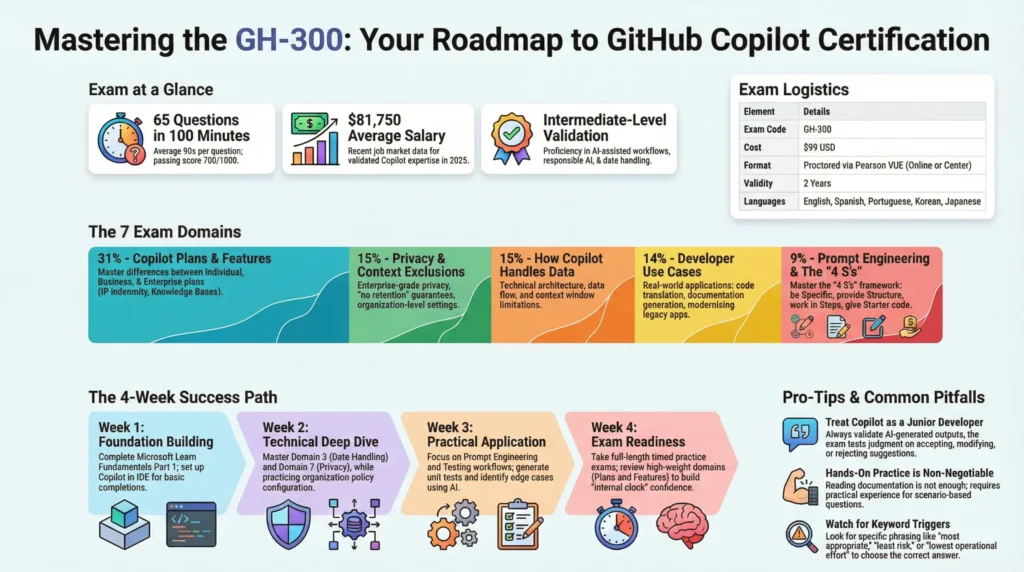
| Element | Details |
|---|---|
| Exam Code | GH-300 |
| Number of Questions | 65 questions |
| Exam Duration | 100 minutes |
| Passing Score | 700/1000 |
| Cost | $99 USD |
| Available Languages | English, Spanish, Portuguese (Brazil), Korean, Japanese |
| Delivery Format | Proctored via Pearson VUE (online or test center) |
| Certification Validity | 2 years |
The exam includes multiple-choice questions and interactive components that test both theoretical knowledge and practical application. With approximately 90 seconds per question, effective time management is essential for success.
Exam Domains and Weighting
Understanding the exam domains is crucial for any GitHub Copilot certification study guide. The GH-300 exam covers seven distinct domains, each weighted differently based on importance.
Domain 1: Responsible AI (7%)
This domain establishes the ethical foundation for using AI coding assistants. You’ll need to understand the broader implications of generative AI in software development and how to use these tools responsibly.
Critical points to master:
- Limitations of generative AI tools (model bias, data depth, training data age)
- The need to validate AI-generated code outputs
- Potential harms including bias, insecure code, fairness, and privacy issues
- Mitigation strategies for AI-related risks
- Transparency and accountability in AI-assisted development
💡 Pro Tip: Always treat GitHub Copilot suggestions as recommendations from a junior developer—helpful but requiring review. The exam tests whether you understand when to accept, modify, or reject AI suggestions.
Domain 2: GitHub Copilot Plans and Features (31%)
This is the largest domain in the GitHub Copilot certification study guide, making up nearly one-third of the exam. Master this section thoroughly to maximize your score.
Critical points to master:
- Differences between Copilot Individual, Business, and Enterprise plans
- Data exclusions, IP indemnity, and billing differences across plans
- Ways to trigger Copilot (chat, inline chat, suggestions, multiple suggestions, CLI)
- Organization-wide policy management and audit logs
- Knowledge Bases in Copilot Enterprise (creating, managing, searching)
- Copilot Chat use cases and best practices
- Available slash commands and chat features on GitHub.com
💡 Pro Tip: Copilot Business adds IP indemnity and organization controls but not Knowledge Bases—that’s Enterprise only. Memorize the feature matrix for each plan.
Domain 3: How GitHub Copilot Works and Handles Data (15%)
Understanding the technical architecture of GitHub Copilot helps you optimize its use and address data privacy concerns in enterprise settings.
Critical points to master:
- Data flow for code completion vs. chat features
- How matching code is detected and handled
- Context window limitations and their impact
- Age of code suggestions (training data relevance)
- Input processing types for Copilot Chat
- Difference between reasoning/context vs. calculations
Domain 4: Prompt Crafting and Prompt Engineering (9%)
Effective prompt engineering is essential for getting quality suggestions from Copilot. This domain tests your ability to communicate effectively with AI tools.
Critical points to master:
- Zero-shot vs. few-shot prompting techniques
- Components of effective prompts (context, intent, specificity)
- Using chat history to improve suggestions
- Context determination and language options
- Best practices for prompt construction
💡 Pro Tip: Remember the “4 S’s” for effective prompts: Be Specific, provide Structure, work in Steps, and give Starter code. This framework appears frequently in exam scenarios.
Domain 5: Developer Use Cases for AI (14%)
This domain covers practical applications of GitHub Copilot in real-world development scenarios.
Critical points to master:
- Learning new programming languages and frameworks with Copilot
- Code translation between languages
- Documentation generation
- Generating sample data
- Modernizing legacy applications
- Debugging and refactoring assistance
- SDLC management and productivity measurement via API
- Understanding Copilot’s limitations in various contexts
Domain 6: Testing with GitHub Copilot (9%)
GitHub Copilot can significantly accelerate test creation. This domain evaluates your understanding of AI-assisted testing workflows.
Critical points to master:
- Generating unit tests, integration tests, and other test types
- Identifying edge cases with Copilot assistance
- How Copilot learns from existing tests to suggest improvements
- Using Copilot for test-driven development (TDD)
- Limitations of AI-generated tests
Domain 7: Privacy Fundamentals and Context Exclusions (15%)
Enterprise adoption depends on understanding privacy controls. This domain is particularly important for administrators and technical leads.
Critical points to master:
- Different SKUs and their privacy considerations
- Code suggestion configuration options at organization level
- Content exclusion settings and file-level controls
- Data retention policies across subscription tiers
- Copilot Business and Enterprise privacy safeguards
- Configuring organizational privacy policies
💡 Pro Tip: Enterprise users get “no retention and no training” guarantees on their prompts and suggestions. This is a key differentiator tested frequently.
GitHub Copilot Certification Study Guide Resources
Success on the GH-300 exam requires a combination of theoretical knowledge and hands-on practice. Focus your preparation on these official resources to build a solid foundation.
Official GitHub and Microsoft Documentation
Your primary study materials should come directly from the source:
- Official GH-300 Study Guide – The definitive exam blueprint with all learning objectives
- GitHub Copilot Documentation – Comprehensive feature documentation and best practices
- GitHub Learn Certification Page – Official learning paths and resources
Official Training and Learning Paths
Microsoft Learn provides free, structured training aligned with exam objectives:
- GitHub Copilot Fundamentals Part 1 of 2 – Core concepts and getting started (approximately 2 hours)
- GitHub Copilot Fundamentals Part 2 of 2 – Advanced features and use cases (approximately 3 hours 20 minutes)
- Course GH-300T00 – Official instructor-led training option
Practice Assessments
The official practice assessment is essential for exam readiness:
- Microsoft Learn Practice Assessment – Simulates real exam format and question types
- Exam Sandbox – Experience the testing interface before exam day
- CertifHub Practice Questions – Additional realistic practice with detailed explanations
Hands-On Practice Environment
Nothing replaces actual experience with GitHub Copilot:
- GitHub Copilot Free tier – 2,000 code completions and 50 premium requests monthly for eligible users
- GitHub Copilot Pro 30-day trial – Full features for comprehensive practice
- GitHub Student Developer Pack – Free Copilot Pro access for verified students
- VS Code or JetBrains IDE – Primary development environments with Copilot integration
💡 Pro Tip: Create a dedicated practice repository and experiment with every Copilot feature mentioned in the exam objectives. Hands-on experience is the most effective way to internalize concepts for this GitHub Copilot certification study guide.
Practice with Realistic Exam Questions
Test your knowledge with 420+ realistic GitHub Copilot certification practice questions on CertifHub featuring detailed explanations that mirror real exam scenarios. Join 112+ certified professionals who prepared with our platform. Build confidence, identify knowledge gaps, and master the exam format before test day.
4-Week GitHub Copilot Certification Study Plan
This structured study plan will help you prepare systematically for the GH-300 exam. Adjust the timeline based on your existing experience with GitHub Copilot and available study time.
Phase 1: Foundation Building (Week 1)
Goal: Establish core knowledge and set up your practice environment.
Daily tasks (2-3 hours):
- Days 1-2: Complete GitHub Copilot Fundamentals Part 1 on Microsoft Learn
- Days 3-4: Set up Copilot in your preferred IDE, experiment with basic code completions and inline chat
- Days 5-6: Review Domain 1 (Responsible AI) and Domain 2 (Plans and Features) thoroughly
- Day 7: Take initial practice assessment to identify knowledge gaps
Phase 2: Deep Dive into Core Domains (Week 2)
Goal: Master the technical aspects of how Copilot works and handles data.
Daily tasks (2-3 hours):
- Days 1-2: Complete GitHub Copilot Fundamentals Part 2 on Microsoft Learn
- Days 3-4: Study Domain 3 (How Copilot Works) and Domain 7 (Privacy Fundamentals)
- Days 5-6: Practice configuring organization policies, content exclusions, and audit log searches
- Day 7: Review weak areas from initial assessment, take additional practice questions
Phase 3: Practical Application (Week 3)
Goal: Develop hands-on proficiency with prompt engineering and developer use cases.
Daily tasks (2-3 hours):
- Days 1-2: Deep dive into Domain 4 (Prompt Engineering)—practice zero-shot and few-shot techniques
- Days 3-4: Study Domain 5 (Developer Use Cases) with practical examples in your IDE
- Days 5-6: Master Domain 6 (Testing)—generate unit tests, find edge cases, practice TDD workflows
- Day 7: Build a small project using Copilot for all stages: coding, documentation, and testing
Phase 4: Exam Readiness (Week 4)
Goal: Consolidate knowledge and build exam-day confidence.
Daily tasks (2-3 hours):
- Days 1-2: Take full-length practice exams under timed conditions (100 minutes, 65 questions)
- Days 3-4: Review all incorrect answers, revisit documentation for weak areas
- Days 5-6: Quick review of all seven domains, focus on high-weight areas (Domain 2 and Domain 7)
- Day 7: Light review only, prepare exam logistics, get rest before exam day
⚠️ Important Note: Consistency matters more than intensity. Studying 2 hours daily is more effective than cramming 14 hours on weekends. The GitHub Copilot certification tests practical understanding that builds through regular hands-on practice.
Exam Day Tips and Strategies
Before the Exam
- Verify technical requirements: Test your webcam, microphone, and internet connection if taking the proctored exam online
- Register with a personal Microsoft account: Using a work/school account means losing exam records if you leave the organization
- Review the exam sandbox: Familiarize yourself with the interface and question types
- Prepare your environment: Clear desk, quiet room, valid ID ready for proctoring
- Get adequate rest: A clear mind performs better than one exhausted from last-minute cramming
During the Exam
- Manage time strategically: With 100 minutes for 65 questions, aim for roughly 90 seconds per question
- First pass quickly: Answer questions you’re confident about, flag uncertain ones for review
- Read carefully: Watch for keywords like “most appropriate,” “least risk,” and “lowest operational effort”
- Don’t second-guess: Your first instinct is usually correct unless you find new information
- Leave time for review: Aim to finish your first pass with at least 20 minutes remaining
⚠️ Important Note: The exam has two sections. The second section contains feedback questions only and you cannot return to Section 1 once you start Section 2. Complete and review all technical questions before proceeding.
Technical Tips
- Focus on Business vs. Enterprise feature differences—these appear frequently
- Understand when to use Chat vs. inline suggestions vs. CLI
- Know the audit log search syntax for Copilot events
- Remember that Copilot does not offer fine-tuning or model weight adjustments
- Privacy questions often distinguish between Individual, Business, and Enterprise tiers
Common Mistakes to Avoid
Mistake 1: Underestimating Domain 2
Problem: Many candidates focus equally on all domains, not realizing Domain 2 (Plans and Features) accounts for 31% of the exam.
Solution: Spend proportionally more time on Domain 2. Create a detailed comparison chart of Copilot Individual vs. Business vs. Enterprise features, including data handling, policy controls, and pricing differences.
Mistake 2: Skipping Hands-On Practice
Problem: Reading documentation without actually using Copilot leads to theoretical knowledge that doesn’t translate to exam success.
Solution: Set up Copilot in your IDE and practice every feature mentioned in the exam objectives. The exam includes scenario-based questions that require practical understanding.
Mistake 3: Ignoring Responsible AI Concepts
Problem: Although Domain 1 is only 7% of the exam, responsible AI concepts thread through questions in other domains.
Solution: Understand when to validate AI outputs, how to identify potential bias, and when Copilot suggestions should be rejected. This knowledge applies across multiple domains.
Mistake 4: Not Taking Practice Exams Under Timed Conditions
Problem: Running out of time on exam day because you never practiced with the 100-minute constraint.
Solution: Take at least two full-length practice exams with strict timing. Build your internal clock to average 90 seconds per question.
Mistake 5: Memorizing Without Understanding
Problem: Trying to memorize answers to practice questions without understanding the underlying concepts.
Solution: For every practice question, understand why the correct answer is right and why other options are wrong. The exam uses varied scenarios that require conceptual understanding.
Is GitHub Copilot Certification Worth It in 2026?
As AI-assisted development becomes the industry standard, the GitHub Copilot certification offers significant career advantages. Here’s a comprehensive analysis to help you decide.
Career Benefits
The certification delivers several professional advantages:
- Validated AI skills: Demonstrates proficiency with the world’s most widely adopted AI developer tool
- Competitive differentiation: Stands out in a crowded job market where AI expertise is increasingly expected
- Enterprise relevance: Shows understanding of governance, privacy, and security—essential for enterprise roles
- Future-proof career: Positions you at the forefront of AI-augmented software development
Job listings increasingly mention GitHub Copilot experience as a requirement or preference. Platforms like Indeed show over 13,800 jobs related to GitHub Copilot certification, spanning software engineering, DevOps, and AI consulting roles.
Financial ROI
Consider the return on your investment:
- Exam cost: $99 USD (with occasional discounts to $35 during promotional events)
- Average salary: GitHub Copilot-related roles average $81,750 annually in the United States
- Salary range: $61,500 (25th percentile) to $117,500 (90th percentile)
- Productivity gains: Studies show developers using Copilot are up to 55% more productive
Even a modest salary increase of 2-3% from demonstrating AI proficiency would recover the exam cost many times over.
Who Benefits Most
This certification provides the greatest value for:
- Developers: Building credibility in AI-assisted development
- Team leads: Evaluating and implementing Copilot for their teams
- DevOps engineers: Managing enterprise Copilot deployments
- Career changers: Transitioning into modern development roles
- Consultants: Advising organizations on AI tool adoption
If you’re considering expanding your GitHub credentials, the GitHub Foundations certification provides an excellent entry point, while the GitHub Actions certification complements Copilot skills for comprehensive GitHub expertise.
Frequently Asked Questions
How long does it take to prepare for the GitHub Copilot certification?
Most candidates need 3-4 weeks of dedicated study, assuming 2-3 hours daily. Those with extensive Copilot experience may require less time, while beginners should plan for 6-8 weeks of preparation.
Can I retake the exam if I fail?
Yes. You can retake the exam 24 hours after your first failed attempt. Subsequent retakes have longer waiting periods to encourage proper preparation between attempts.
Is hands-on Copilot experience required?
While not a formal prerequisite, practical experience is essential for passing. The exam includes scenario-based questions that assume familiarity with Copilot features in real development workflows.
What’s the difference between Copilot Individual, Business, and Enterprise?
Individual is for personal use with basic features. Business adds organizational controls, IP indemnity, and audit logs. Enterprise includes Knowledge Bases, organization-wide chat on GitHub.com, and advanced compliance features.
How is the exam proctored?
The exam is delivered through Pearson VUE. You can take it at a testing center or online with remote proctoring from your home or office.
Does the certification expire?
Yes, the GitHub Copilot certification is valid for two years from the date earned. You’ll need to recertify to maintain your credential.
Are there any prerequisites for taking the exam?
There are no formal prerequisites, but GitHub recommends foundational understanding of GitHub and hands-on experience with Copilot features before attempting the exam.
What programming languages does the exam cover?
The exam tests Copilot concepts across languages rather than specific language syntax. You should understand how Copilot works with various languages, with JavaScript being particularly well-supported.
Is the exam available in languages other than English?
Yes, the GH-300 exam is available in English, Spanish, Portuguese (Brazil), Korean, and Japanese.
How do I maintain my certification after passing?
The certification remains valid for two years. To maintain certified status, you’ll need to pass the current version of the exam before your certification expires.
Next Steps: Start Your GitHub Copilot Certification Journey
This GitHub Copilot certification study guide has equipped you with everything needed to succeed on the GH-300 exam. The combination of understanding exam domains, using official resources, hands-on practice, and strategic exam preparation will set you up for first-time success.
Your action plan:
- Set up your environment: Install Copilot in VS Code or your preferred IDE and start experimenting
- Complete official training: Work through both GitHub Copilot Fundamentals modules on Microsoft Learn
- Take a baseline assessment: Identify your knowledge gaps with practice questions
- Follow the 4-week study plan: Build skills systematically across all seven domains
- Schedule your exam: Commit to a date and work backward to ensure adequate preparation
Remember, this certification validates skills that are becoming essential in modern software development. As AI tools continue to transform how we write code, certified professionals will lead the way in implementing these technologies responsibly and effectively.
For more certification preparation resources, explore our comprehensive study guides for AWS Certified Cloud Practitioner, CompTIA Security+, CompTIA Data+, Google Professional Cloud Architect, and Azure Fundamentals.
Download Free Practice Exam PDF
Ready to start your preparation? Download our free GitHub Copilot certification practice exam PDF with 42 sample questions and detailed answer explanations. Test your current knowledge level and identify areas to focus on before exam day.